 English
 Crnogorski
 Русский
InVero's AI Legal Assistant: How It Works
Laws only in the local language, amendments scattered across separate acts, chatbots that invent provisions: how an AI legal assistant solves these problems.
 InVero editorial team10 min read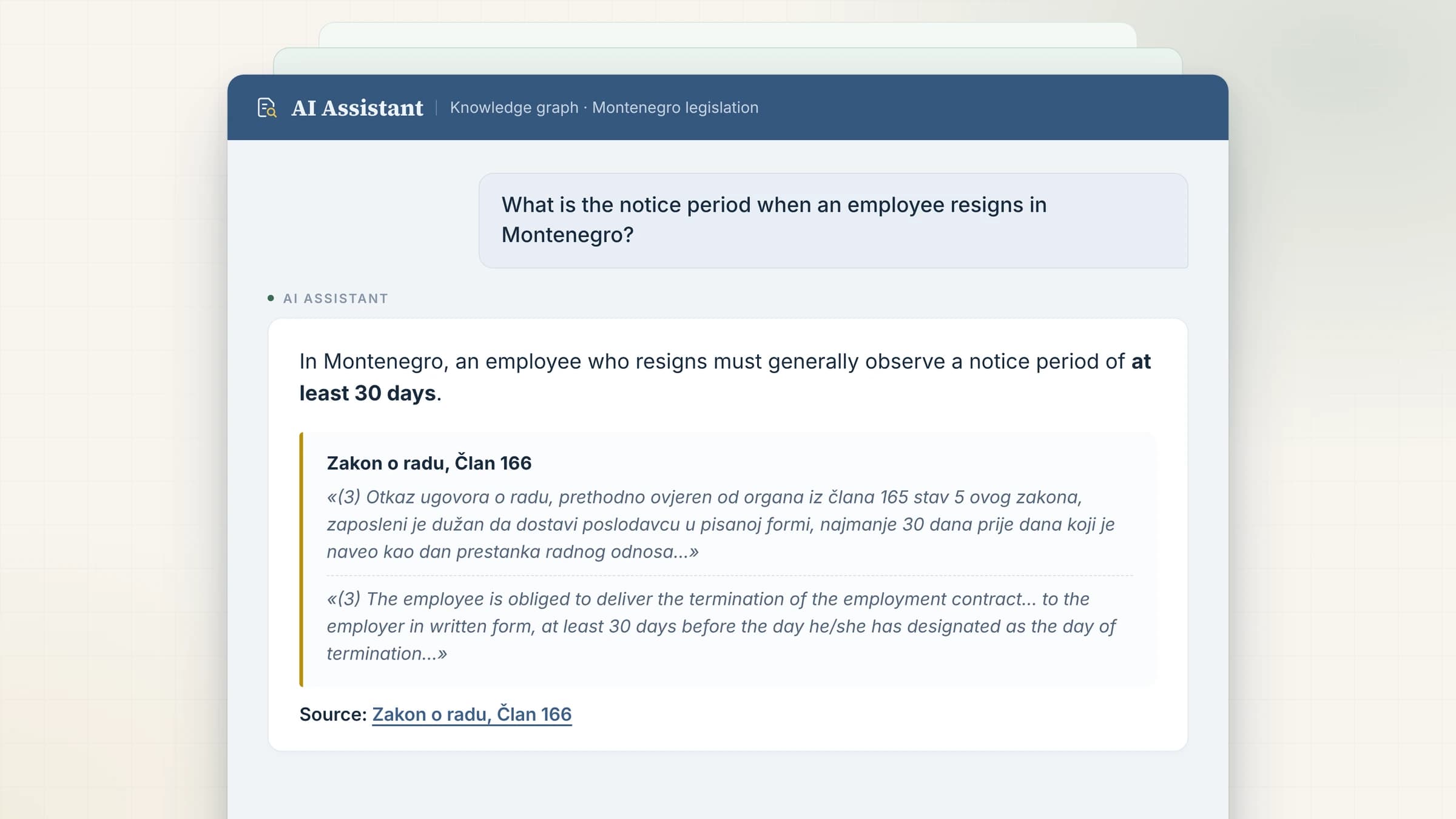
Key takeaways
- 1Why finding the provision in force is harder than it looks — even when you know exactly which law you need.
- 2Why general-purpose LLMs are unfit for legal questions, and where the non-existent articles in their answers come from.
- 3How InVero's assistant answers in any language, and why every conclusion it reaches can be verified in seconds.
- 4Why lawyers need case law tied to a specific article of the law, not a search for decisions by case number.
- 5What Quick Search covers, what Document Review adds, and what each role costs.
InVero's AI legal assistant answers legal questions using only a verified database of legislation and case law. Every conclusion is backed by the provision quoted in its original language, a translation into the language of your question and a link to the article in the version currently in force. You can ask in any language, in your own words, without knowing the country's legal terminology.
Montenegro is the first jurisdiction on InVero, and we use it here to show how the assistant works. Adding new countries is the platform's next stage of development.
Why legal answers are harder to find than they seem
A legal question rarely comes down to reading a single statute. In practice, three obstacles stand between the question and the answer.
- The language barrier. Laws are published in the official language of the state. A foreign entrepreneur, investor or resident without a strong command of that language struggles even to identify which act governs their situation, let alone read the provision precisely.
- Scattered amendments. Many countries, particularly smaller ones, have no single system of consolidated texts: each amendment is published as a separate act, and the current text of a law has to be pieced together by hand from several issues of the official gazette. Montenegro's Labour Law, for example, has ten amending acts recorded on InVero.
- The mass of secondary legislation. A specific situation is often governed not by a law but by a government decree, a ministerial rulebook or an agency decision. Among thousands of such instruments it is easy to miss the one in force, or to rely on one that has lapsed.
InVero addresses these problems at the data level: laws are kept as consolidated texts in force with their full amendment history, and the links between acts form a knowledge graph. The assistant works inside that structure, so it looks for the answer in verified documents rather than reconstructing it from memory.
Why general-purpose chatbots fall short on legal questions
General-purpose language models answer confidently and persuasively, but for legal work they have systemic limitations:
- Outdated knowledge. A model knows the law as of its training date. Amendments adopted later simply do not exist for it.
- Non-specialist sources. Much of the training data comes from news sites, forums and social media, where legal rules are often simplified or distorted.
- Gaps in specialised instruments. Decrees, rulebooks and agency decisions are poorly represented in publicly available data. When a model cannot find the provision, it tends to fill the gap with plausible but invented content.
- Simplification without sources. An answer that does not point to a specific article and version cannot be verified, and so cannot be relied on.
How InVero's AI legal assistant works
The InVero AI assistant is a legislative research tool confined to the InVero database. It works with laws in their versions in force, their amendments, the links between acts and, on the Pro plan, case law. The assistant plans its own research: it identifies the relevant acts, reads the articles it needs, compares versions and traces a provision's amendment history. The panel shows its progress — for example “Searching the knowledge graph”, “Examining the provision”, “Verifying the citations”.
Before an answer is shown, its citations are checked: every quoted original must match, word for word, text the assistant retrieved from the database in that session. The answer therefore gives the exact wording of the provision, not a loose paraphrase.
The assistant adapts to the user's language: ask in any language and the answer arrives in the same language, with the provision quoted in the original and translated. Users from any country need neither the jurisdiction's official language nor any of the platform's interface languages.
How to ask a question: four steps
Step 1. Open the assistant
Sign in to InVero and open the library, for example Montenegrin legislation. The AI Assistant button sits at the top of the left panel, above “Library”. On the home page, use Ask the AI Assistant. If you are not signed in, the button opens the sign-in dialog.
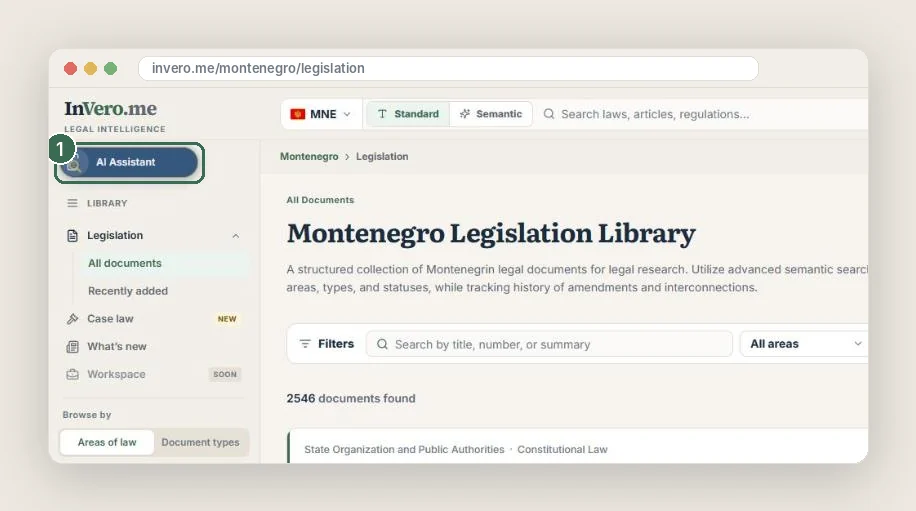
The assistant is paid for from your account balance. If the balance is empty, the assistant offers two options: a bonus for following one of InVero's social channels, or a top-up.
Step 2. Choose a role and a model
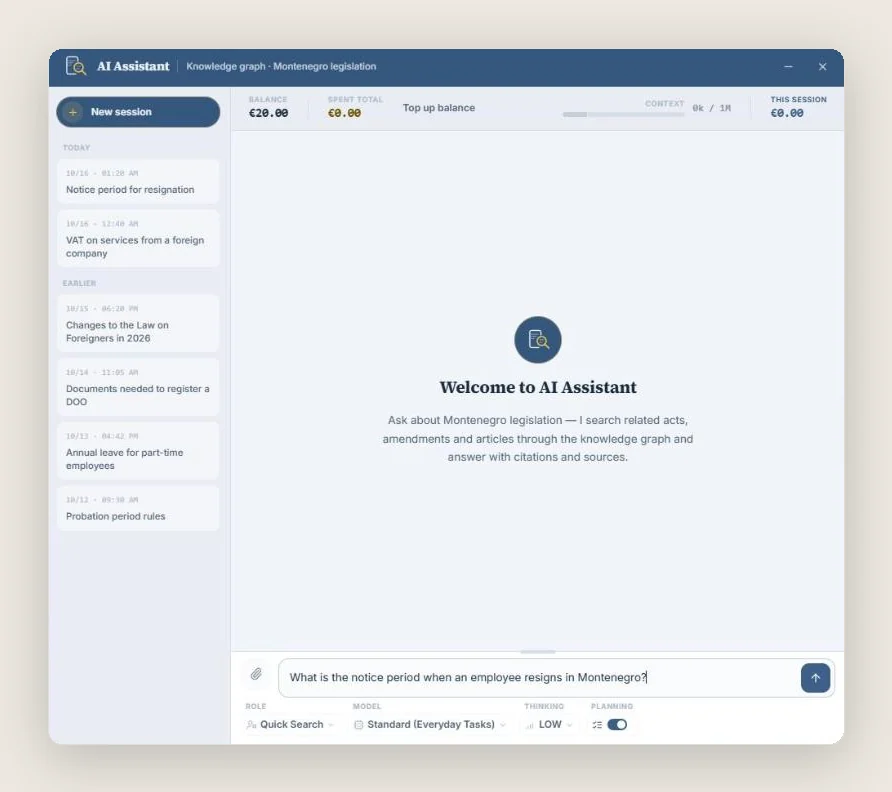
The settings sit below the question field:
- Role defines the assistant's task. For legal questions, choose Quick Search. The role is fixed when the session starts.
- Model — for example Standard (Everyday Tasks) for everyday questions. You can switch models during a session.
- Thinking sets the depth of analysis.
- Planning lets the assistant keep a research plan and notes, which helps with complex, multi-part questions.
Step 3. Put the question in your own words
Describe the situation as you would to a lawyer: who you are, what happened and what outcome you need. Keywords and article numbers are not required. Once the question is sent, the panel shows which sources the assistant is examining.

If you press Minimize or close the panel, the answer continues to be prepared on the server. When it is ready, InVero notifies you: “The assistant has answered”. To rephrase a question, use Edit and re-send.
Step 4. Check the answer against the source
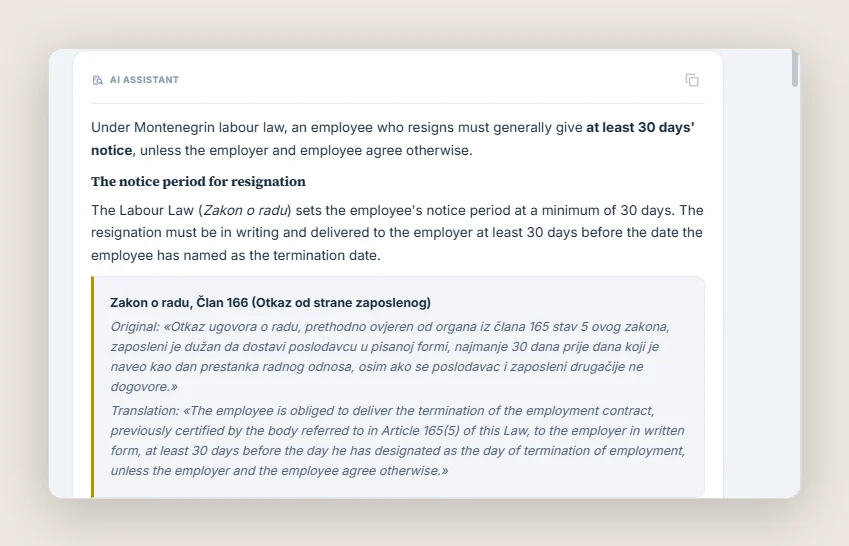
The answer contains a block with the name of the law, the article number, the original wording and a translation, followed by a link to the article.
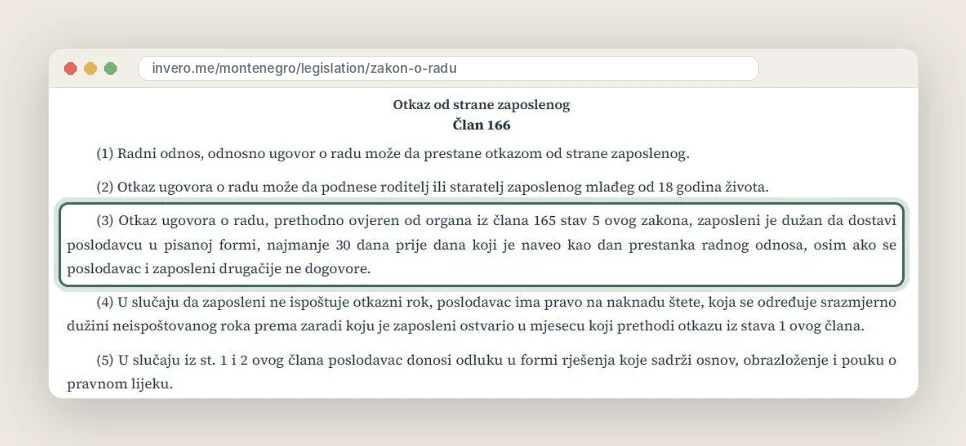
The link opens the law's page on InVero at that exact article, with the full text in force, a table of contents and the list of amending acts. Confirming that the conclusion rests on that provision takes a few seconds.
A worked example: the notice period on resignation
On 16 October 2026 we asked the assistant: “What is the notice period when an employee resigns in Montenegro?” (Quick Search role, Standard model). The answer arrived in under a minute and the query cost about €0.02.
An employee must deliver the resignation to the employer in writing at least 30 days before the date they have named as the end of employment, unless the employer and the employee agree otherwise.
The assistant cited Article 166(3) of Montenegro's Labour Law (Zakon o radu) with its original text and noted that the same 30-day minimum appears in the article on the notice period. Asked the same question in Montenegrin, it also pointed to paragraph 4 of that article: an employee who does not observe the notice period may be liable for damages.
The example illustrates the recommended way of working: the assistant quickly finds the applicable provision and puts its text in front of you, while the legal assessment of a specific situation — whether a different period may be agreed, for instance — remains with the professional, made on the basis of the law itself.
Case law on the Pro plan
For a practising lawyer, the text of the statute is only half the answer. How a provision is applied in practice, what positions the highest courts have taken, whether the Constitutional Court has struck a provision down — these questions shape a case as much as the wording of the article itself.
Researching case law has traditionally been time-consuming. Decisions are published in many places — individual court websites, judicial portals, collections and bulletins — and search across them is often limited to case numbers or exact word matches, or absent altogether.
On InVero, case law is brought together in a single section and linked to the legislation:
- court decisions and legal positions from court bulletins sit in one database, filterable by court, register, area of law and outcome;
- search works by meaning as well as by case number;
- every decision is linked to the articles of law the court examined, and Constitutional Court decisions that annul a provision are reflected in the text of the law itself.
On the Pro plan, the assistant draws on this database when it answers: it finds decisions and legal positions concerning a specific article, reads the text of the decision and quotes it alongside the statutory provision. Instead of hours spent searching scattered sources, the lawyer receives the provision and the practice of its application in a single answer, with the full text of every decision one click away. Without a subscription, the assistant answers from the legislation and tells you when relevant case law exists.
Two roles: Quick Search and Document Review
| Role | Purpose | Access |
|---|---|---|
| Quick Search | Legal questions and real-life situations: the assistant finds the provisions in force that apply to the case. | With an available balance |
| Document Review | Checking a contract or other document against the law: conflicts with provisions, risks, missing mandatory clauses. | Pro |
Attach a document for review with Attach a document. Supported formats are PDF, PNG, JPEG, WebP, Markdown and plain text — up to 20 MB and 50 pages, with no more than five files per session. Scans are transcribed on the server, and you can compare the result with the original using Check the transcript. Transcription is charged to your balance.
Access and pricing
The assistant is available after signing in and is charged by actual use. The cost of a query depends on the model chosen and the volume of material examined; spending is shown in the panel, in the “Balance”, “Spent total” and “This session” fields.
| AI Assistant Balance | Pro Plan | |
|---|---|---|
| Price | from €5, one-time top-up | €49 per month |
| Assistant credit | never expires | €20 monthly credit included |
| Models | reliable baseline models | advanced models for complex analysis |
| Case law in answers | — | yes |
| Document Review and file attachments | — | yes |
On Pro, the subscription budget is used first, followed by any balance you have purchased. You can try the assistant free of charge with the bonus for following an InVero social channel, which the assistant offers when your balance is empty. Current terms are set out on the pricing page.
Scope and limitations
- The assistant is a legal research tool, not legal advice. Decisions with significant legal consequences should be taken with the involvement of a lawyer.
- Verify the provision via the link. It leads to the version in force, where related paragraphs, exceptions and cross-references are visible.
- The precision of the answer depends on the precision of the question. State your position (employee, employer, foreign national) and the material circumstances.
Frequently asked questions
Do I need to speak the country's language to use the assistant?
No. Ask in your own language: the assistant answers in the same language and quotes the provision in the original with a translation.
Which countries' legislation is available?
InVero currently covers the legislation and case law of Montenegro. Adding new jurisdictions is the platform's next stage of development; you can vote for the next country on the InVero home page.
What are the answers based on?
Solely on the InVero database: laws in their versions in force, their amendments and the links between acts, plus case law on the Pro plan. Citations are checked against the database text before the answer is shown.
Is my query history saved?
Yes. Every session is listed on the left, and you can return to any of them. For a new topic, use New session.
What happens if I close the window while the assistant is answering?
The answer continues to be prepared on the server. When you reopen the assistant, it will be in the same session.
Next step: open the legislation library, click “AI Assistant” and ask about your situation. To keep up with legislative changes, read the weekly reviews and the list of recently added documents.